A Tiny “Finished Reading” Stamp GIF with a Free Image-to-Video Generator, No Signup Required

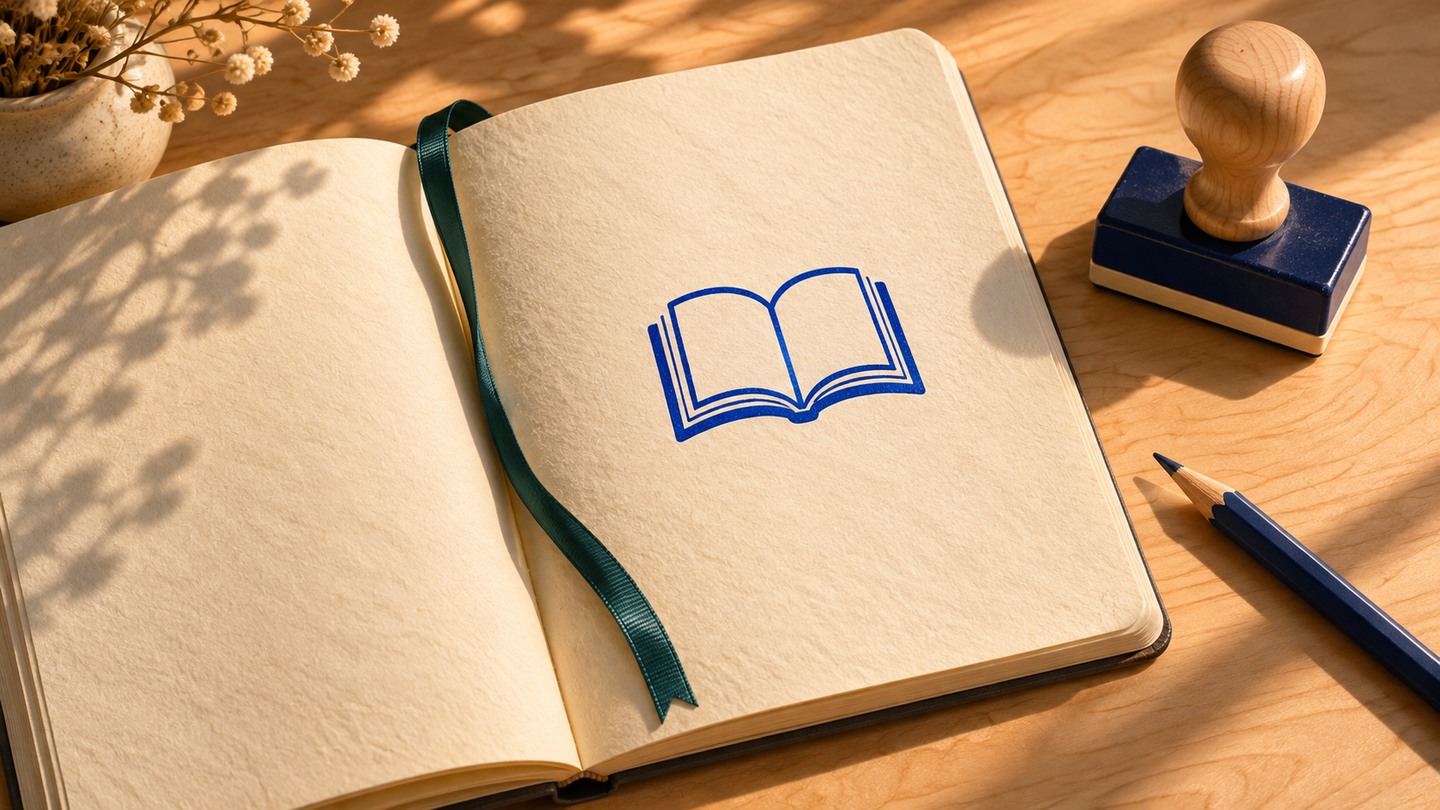
You close the book, jot down the date and write one line about what stayed with you. A little stamp can give that last line its own moment. Imagine a wooden stamp tapping the page beside a blue open-book doodle. It can become a small GIF you reuse every time you finish a book, with a still image ready for places where animation doesn’t play.
Draw a mark that makes sense at a glance
Draw a small open book on a clean notebook page or cream card. Two page shapes, a centre fold and one dark colour are enough. Set a stamp beside it, leaving a little gap so the mark stays visible. Use your own drawing and keep the title and date in the reading note itself.
Leave a little space between the icon and the stamp so the book stays visible during the tap.
For this example, the book icon is already on the paper when the shot begins. The stamp makes a little tap beside it. That gives you a clear finished reading gesture without asking the animation to create a crisp drawing under a moving prop.
Prepare two stills of the same tap
Take two photos from a fixed low angle so you can see the space under the stamp.
- In the first, hold the stamp a few millimetres above the page, beside the book icon. Keep fingers out of the frame if you can do so safely. Drawing both stills is an easy alternative if positioning the real stamp is fiddly.
- In the last, set its base flat on the paper directly below that spot. Keep the notebook, book icon, lighting and camera where they were.
Plan the first and last positions side by side. Prepare them as two separate stills for the tool.
Crop both stills the same way. A landscape shot is fine if the stamp and the mark both fit, with some space around them. Use your two separate image files. The article uses original teaching illustrations, and the motion is a proposed example.
Try the free image-to-video workflow on OpenMaker. OpenMaker describes its free workflow as powered by MiniMax H3, with five-second clips at 480p, unlimited attempts and no signup. Add the raised stamp as the first image and the resting stamp as the last. Pick the ratio you used to prepare the images. For small motions like this, prompts can name one moving part and the things that should stay in place.
Fixed camera. The small wooden stamp descends straight down a few millimetres and lands gently on the notebook page beside the blue open-book icon. Keep the book icon visible and unchanged. Keep the stamp upright, with the same wood knob and rectangular blue base. Keep the page, lighting and camera still. Let the stamp rest after the tap.
If a clip completes, watch it before exporting a GIF. Keep a candidate only if the stamp lands cleanly and the book icon still looks like a book. If the tap is buried in changing shapes or camera motion, try a shorter move in the source images or use the original still.
Keep the tap, trim the wait and make the GIF
A five-second clip may contain only a second or two you want to repeat. Scrub through the downloaded video. Note the moment just before the stamp starts to move and the moment just after it settles. If it starts moving at 1.2 seconds and settles at 2.3, for example, you might keep 1.0 to 2.6 seconds. Use the times you actually see.
For the conversion step, Ezgif’s video-to-GIF tool lets you select an interval from a compatible video. Upload only the clean clip you’re comfortable sending to the converter.
- Enter your start and end times. You can also pause at each point and use the current video position.
- Choose a modest output width that still shows the mark clearly and try a low frame rate. Compare the preview. If the landing is too abrupt, try a higher frame rate.
- Convert and save the GIF. Open that saved file, watch where it resets and check its file size. If it’s larger than you want, try a shorter segment or smaller dimensions, then compare the saved copies. The reset can be a visible little jump.
Keep a JPG for the same reading note
Crop a clean copy of your original book-icon image so the icon reads at a small size. Export it as a JPG and save it alongside your GIF. Write the label Finished reading in the post, then add your real title, date and takeaway as normal text. Either image can sit beside that same line.
The same open-book motif works as a still. Put the title and date in the reading note so they stay readable alongside either version.
Pckt’s editor supports placing images beside text. If you try the GIF, look at the post preview to see whether the motion survives. Use the JPG if the GIF won’t play or if the little tap keeps pulling your eye away from the note. A simple alt description for the still is “Blue open-book icon on cream paper.”
Save both versions somewhere you’ll remember. Then the next time a book ends, the part you get to spend time on is the sentence you want to keep.